
- Launched
- Oct 22, 2026
- Website
- docmend.app
- Pricing
- Free
- Platforms
- Web, Chrome extension
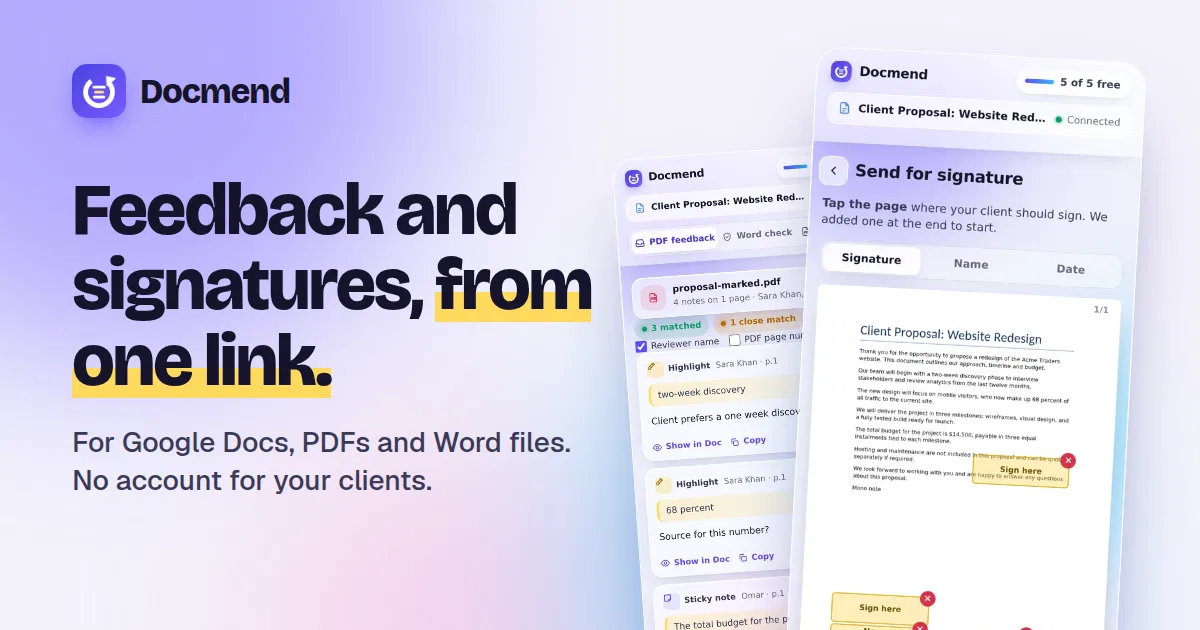
Docmend is a Chrome extension that collects client feedback and e-signatures on Google Docs, PDFs and Word files with one link. It opens in a side panel next to your document. Send a review link and your client highlights text and leaves notes in any browser, with no account and nothing to install; those notes come back as real comments on the same words in your Doc. Send a signature request and they sign on a phone or laptop, and the signed PDF with a signing certificate is emailed to you both. Docmend can also import notes from a marked-up PDF, check a Doc before you send it as Word, and export a PDF that keeps your comments. Files are uploaded for review links and signature requests. Docmend is free, with no limits and no paid plans: 41 free PDF and image tools at docmend.app/tools and docmend.app/image-tools, unlimited review links and unlimited signature requests. Docmend is not related to DocSend or other products named DocMend.
What Docmend does
- Client review links: Share a read-only link where reviewers highlight text and leave notes using only their name.
- Simple e-signatures: Place signature, name and date fields, then send a signing link by email or by copying it.
- Comments returned to documents: Add reviewer notes to a Google Doc as comments on the same text, or download PDF comments.
- Word readiness check: Find replaceable fonts, leftover comments, unresolved suggestions and oversized images before sending a Word file.
- PDF tools: Merge, split, reorder, rotate, compress, protect, edit, sign and convert PDF files.
- Browser-based processing: Importing notes, document checks, PDF tools and PDF export run in the browser; uploads are limited to specified workflows.
Who it's for
Freelancers and teams that send Google Docs, PDFs or Word files to clients for feedback, approval or signature.
Why people use Docmend
Client feedback and signatures are often scattered across email, document apps and separate signing tools, with recipients required to create accounts.
Docmend creates one review or signing link so clients can comment or sign in a browser, while document owners manage notes, signatures and PDF tasks from the extension or website.
It combines client review, simple e-signatures and browser-based PDF tools for Google Docs, PDFs and Word files, without requiring clients to create an account.
Pricing
Docmend is free to use.
Platforms
Docmend runs on Web, Chrome extension.
Docmend FAQ
- Do clients need a Google account or the extension?
- No. Clients open the review or signing link in any browser, leave notes, approve or sign, and do not need an account or the extension.
- Do I need to install anything?
- PDF, image and video tools run on docmend.app in a browser. Client feedback and signatures for Google Docs use the free Chrome extension.
- Are my files uploaded?
- Most tools run in the browser. A copy is uploaded for a review link or signature request, and conversions such as PDF to Word are sent to the conversion service and deleted afterward.
- How much does Docmend cost?
- Docmend is free for everyone, with no limits and no paid plans. All 41 PDF and image tools are unlimited, and review links with unlimited notes and unlimited signature requests are included. No account, card or trial is needed.
- Does Docmend work with PDFs and Word files?
- Yes. It works with Google Docs, PDFs and Word files. You can use a document open in your tab, upload a file or paste a link.
- Is the signature legally binding?
- Docmend provides a simple electronic signature with the signer’s name, date and a signing certificate. It is not a certified or qualified e-signature, and legal effect depends on the document and jurisdiction.
- How do I get the signed document back?
- When the client finishes, the signed PDF is emailed to both parties with a signing certificate attached as the last page. It is also available for download in Docmend.
- Can I cancel anytime?
- There is nothing to cancel: Docmend has no paid plans. If you bought Pro or Pro Plus earlier, it keeps working, and you can cancel from the link in your receipt email.
Docmend launched on IndieLaunch on October 22, 2026 in SaaS, Productivity. Visit Docmend
New to these terms? Read what Side project and Indie hacker mean.
Docmend alternatives
 JPG to PDF MobileFree JPG to PDF converter. No uploads, no sign-up.
 DropLinkShare files by link without requiring the recipient to install an app
 Yap Voice TypingFree voice typing for any text box. Press Alt+Shift+Y and talk.
 tmps.fyiShare text, images, files and screenshots across devices.
 WhatsClawSchedule, auto-reply & automate WhatsApp from your phone
Discussion(0)
Sign in to leave feedback for the maker.
Log inNo comments yet
Be the first to give the maker feedback.