
- Launched
- Oct 21, 2026
- Website
- yapapp.cc
- Pricing
- Freemium
- Platforms
- iOS
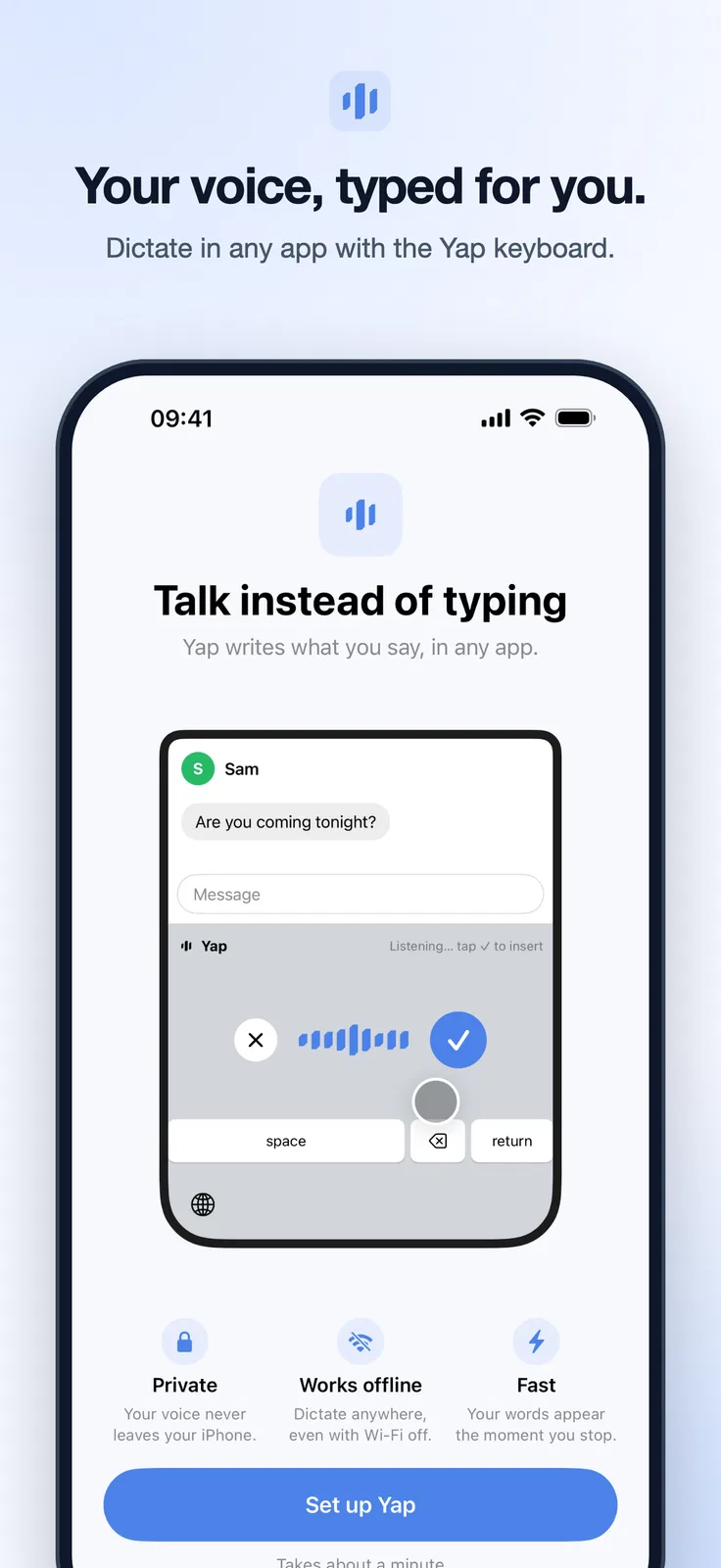
Yap for iPhone is private voice dictation for your iPhone. It is a keyboard plus an app: switch to the Yap keyboard in any app, tap the microphone, speak, and Yap turns your speech into clean, punctuated text and types it where your cursor is. Messages, Mail, Notes, browsers and most other apps work the same way.
Speech recognition runs on your iPhone, using an NVIDIA Parakeet speech model that is downloaded once (about 800 MB) inside the app. After that, Yap works offline, your audio is never uploaded, and your dictation history stays on the phone.
The app includes a short walkthrough that shows how to add the keyboard and allow Full Access, so setup takes a few taps. After you dictate, Yap keeps the microphone ready for a few minutes, so the next dictation starts at once. You choose how long in Settings.
Yap detects the language of each dictation automatically. It supports English and 24 other European languages with no setting to change. It adds punctuation and capital letters as you speak.
Yap is free to start: create a free account with your email (a code is emailed to you) and get 3 free days, then a 10-day trial with a card, then a subscription at USD 6.90 per month or USD 69 per year. One subscription covers Yap on Mac, Windows, Android and iPhone. There are no in-app purchases and no ads.
Who it is for: people who write a lot on their phone (replies, notes, long messages), anyone with repetitive strain or other reasons to type less, and anyone who would rather not send their voice to a server.
The iPhone app is in public beta on Apple's TestFlight, so you can install it today by opening the TestFlight join link on your iPhone. It requires iOS 17 or later. Privacy policy: https://yapapp.cc/legal/privacy
The Yap team, O-mega Enterprise Inc.
What Yap for iPhone does
- Dictate into any app: Hold a shortcut and Yap types cleaned-up speech wherever the cursor is, including email, chat, documents, AI tools, and notes.
- On-device transcription: Speech recognition runs on the device; recordings are not uploaded or saved as audio.
- Private voice coding: Dictate into terminals, editors, coding agents, and SSH sessions without sending audio, code, or screen text away.
- Mobile Yap keyboard: Use the Yap keyboard to dictate in apps on iPhone and Android.
- Language detection: Detects 25 languages as you speak.
- Offline dictation: After the speech model is downloaded, dictation can work offline, subject to access limits.
Who it's for
People who want to write in desktop or mobile apps by speaking, including writers, developers, and people managing wrist pain or RSI.
Why people use Yap for iPhone
Typing can be slower than speaking, and cloud dictation services may send recordings, code, or screen text to their servers.
Yap transcribes speech on the device and inserts cleaned-up text into the app or text field already in use.
On-device speech recognition keeps recordings, transcripts, and code on the device while supporting dictation across Mac, Windows, iPhone, and Android.
Pricing
Yap for iPhone is free to start, with paid plans from $69/year.
Platforms
Yap for iPhone runs on iOS.
Yap for iPhone FAQ
- How does Yap work?
- Hold one key or use the mobile keyboard, say what you want to write, and release. Yap types the resulting text into the app or text field you are using.
- Does my voice leave my device?
- No. Recordings are transcribed on the device and are not uploaded or saved as audio. Dictation history stays on the device until deleted.
- Which devices does Yap support?
- Yap is available for Mac, Windows, iPhone, and Android. The Mac website edition requires Apple silicon and macOS 13 or later.
- Is there a free trial?
- A free account includes 3 days with no card. To continue dictating, start a 10-day trial with a card on either paid plan.
- Does Yap work offline?
- After the speech model is downloaded, dictation works offline. Internet access is required for first launch, activation, and periodic access checks.
- How many languages does Yap support?
- Yap supports 25 languages, detected as you speak.
- What happens to my history if access ends?
- New dictation pauses, but existing history remains on the device and stays readable, copyable, and deletable.
Yap for iPhone launched on IndieLaunch on October 21, 2026 in Productivity. Visit Yap for iPhone
New to these terms? Read what Beta launch, Freemium and Product-led growth mean.
Yap for iPhone alternatives




Discussion(0)
Sign in to leave feedback for the maker.
Log inNo comments yet
Be the first to give the maker feedback.