
- Launched
- Oct 20, 2026
- Website
- chromewebstore.google.com
- Pricing
- Free
- Platforms
- Chrome extension
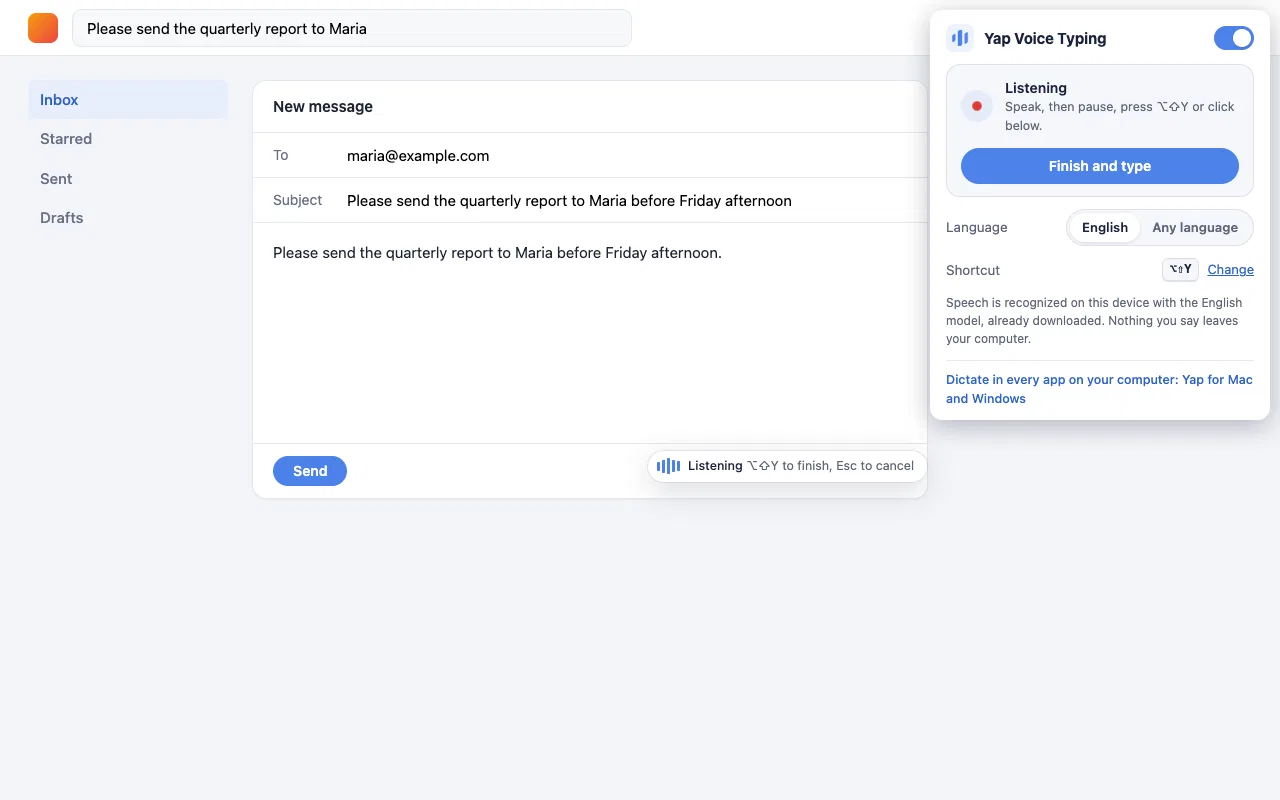
Type with your voice in any text box on the web. Click into a text field, press Alt+Shift+Y (or click the Yap icon) and talk; your words are typed where the cursor is, in email, search, chat, notes and documents. OpenAI's Whisper model runs inside your browser, so your voice is never uploaded: no server, no account, no analytics. English or any of 99 languages, capitals and punctuation added, filler words removed, works offline after a one-time ~80 MB model download.
What Yap Voice Typing does
- Voice typing in web fields: Dictate into inputs, text areas and rich-text editors on websites.
- On-device Whisper: Runs OpenAI's Whisper speech model inside the browser without uploading voice recordings.
- English or 99 languages: Use English or select Any language to detect one of 99 languages per recording.
- Clean text output: Adds capitalization and punctuation and removes “um” and “uh.”
- Pause or shortcut to finish: Recording ends after a short pause or when the shortcut is pressed again; Esc cancels.
- Offline after setup: The model downloads once, is cached by the browser and works offline afterward.
Who it's for
People who want to dictate text into websites, including email, search, chat, notes and document editors.
Why people use Yap Voice Typing
Typing long text into web forms and editors can be slow, and sending voice recordings to a server can create privacy concerns.
Yap converts speech to text in the browser and inserts the result into the active web text field without uploading the user's voice.
The extension runs OpenAI's Whisper speech model on the user's device, with no account, server or analytics, and continues working offline after the model download.
Pricing
Yap Voice Typing is free to use.
Platforms
Yap Voice Typing runs on Chrome extension.
Yap Voice Typing FAQ
- Is Yap Voice Typing free?
- Yes. The Chrome Web Store listing describes it as free voice typing with no account.
- Is my voice uploaded?
- No. Whisper runs on the device in the browser, and the listing says voice is never uploaded.
- Which languages does it support?
- It supports English and an Any language mode that detects which of 99 languages you speak for each recording.
- How do I start dictating?
- Click into a text field, press Alt+Shift+Y, or click the Yap icon, then speak. Pause briefly or press the shortcut again to insert the text.
- How long can one recording be?
- Each recording can last up to 2 minutes, with as many recordings as needed.
- Will it work in every online editor?
- It works in ordinary text boxes and rich editors. Some pages that draw their own text provide the result on the clipboard and show a Ctrl+V note.
Yap Voice Typing launched on IndieLaunch on October 20, 2026 in Productivity. Visit Yap Voice Typing
New to these terms? Read what Side project and Indie hacker mean.
Yap Voice Typing alternatives
 Yap Online DictationFree online dictation that stays on your device.
 Yap Audio to TextFree audio and video transcription that never uploads your file.
 247999.XYZPrivate notes, encrypted paste links and privacy tools in your browser
 Simplixit AIAn AI assistant for chat, media creation, polls, documents, and voice
 VNCNT GridnabTurn web tables and lists into CSV in one click
Discussion(0)
Sign in to leave feedback for the maker.
Log inNo comments yet
Be the first to give the maker feedback.