
RemoveHandwriting
Remove handwriting from worksheets, PDFs and scans with AI
- Launched
- Oct 25, 2026
- Website
- removehandwriting.com
- Pricing
- Freemium
- Platforms
- Web, iOS, Android, API
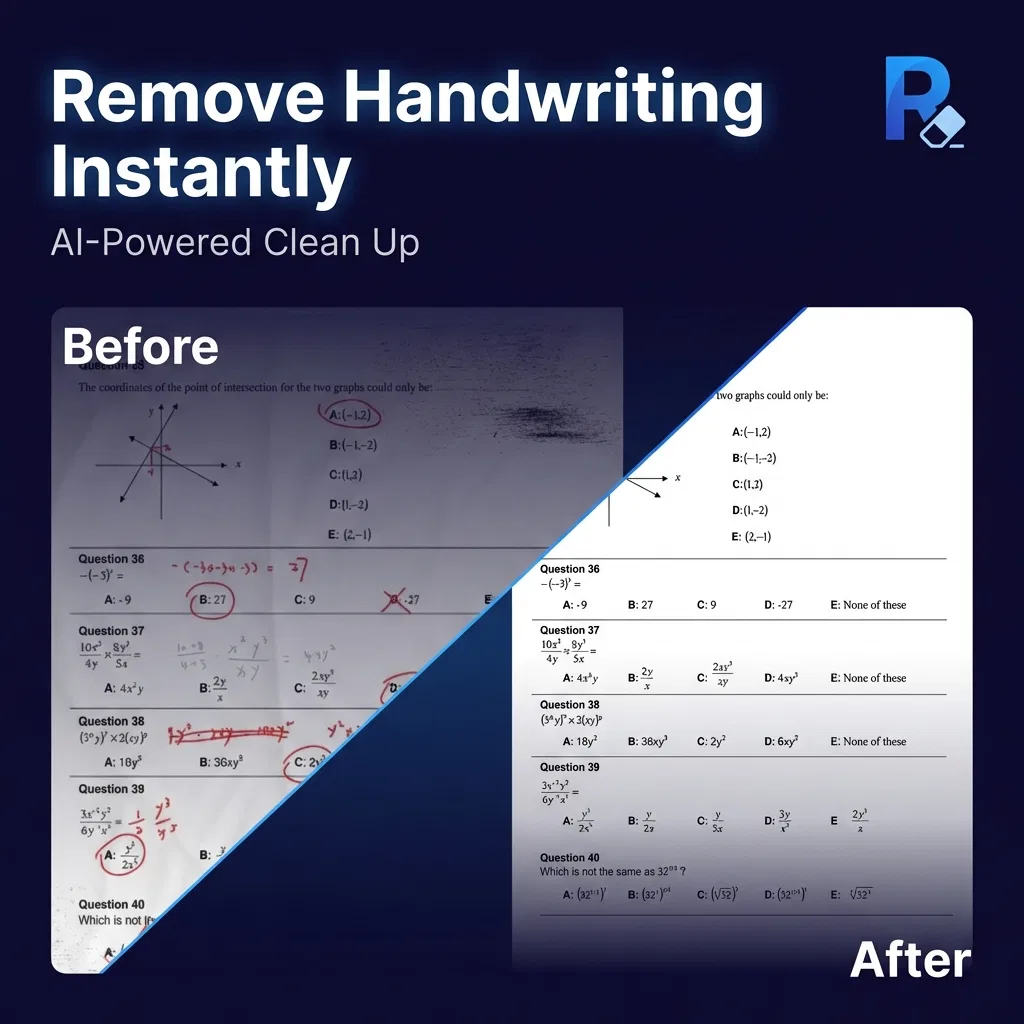
AI tool that erases handwritten answers, notes and pen marks from photos, scans and PDFs while keeping printed text, tables and layout intact. For teachers, students and parents. Freemium. Web, iOS, Android.
What RemoveHandwriting does
- Handwriting and mark removal: Removes handwritten text, notes, annotations, pen strokes, underlines, highlights and scribbles from document images and PDFs.
- PDF page selection and export: Previews PDF pages, lets users select pages to process, and exports cleaned results as a downloadable PDF.
- Document restoration: Corrects skew, rotation, curled or warped pages, shadows, stains, uneven backgrounds and other scan distortions.
- Color-preserving cleanup: The Color model is intended for pages where original colors, highlights or colored elements need to be preserved.
- Bulk image processing: Processes multiple JPG, PNG or JPEG image files in one workflow.
- REST API: Provides a REST API with Bearer-token authentication, code examples and image-cleanup endpoints for integrations.
Who it's for
Students, teachers, parents, businesses, records managers, archivists and developers handling documents with handwritten marks.
Why people use RemoveHandwriting
Handwritten answers, annotations and marks can make worksheets, scanned documents, forms and PDFs difficult to reuse, share, archive or print.
It analyzes uploaded images and PDFs, removes handwriting and related marks, and outputs cleaned documents while aiming to preserve printed content, layout and colors.
The service combines handwriting removal with document restoration features such as page correction, auto-cropping, shadow and stain removal, plus manual processing for difficult files.
Pricing
RemoveHandwriting is free to start, with paid plans from $3.9/month.
Platforms
RemoveHandwriting runs on Web, iOS, Android, API.
RemoveHandwriting FAQ
- What files does RemoveHandwriting support?
- The web tool supports JPG, PNG, JPEG and PDF workflows. Image uploads can be up to 10MB per file; PDFs can be up to 50MB and 50 pages.
- How many free credits do new users get?
- New users get 3 free credits on signup. Credits can also be earned in the mobile app by watching ads and through referrals.
- How do Standard, Color and Ultra differ?
- Standard uses 1 credit per image and is the fastest option for typical scan cleanup. Color uses 3 credits and is for pages where colors matter. Ultra uses 5 credits and is for more difficult scans.
- Are uploaded files stored or used for training?
- Uploaded files are used only for processing, automatically deleted after processing and not used for AI model training.
- Do purchased credits expire?
- Purchased credit packs never expire. Subscription credits roll over while the subscription remains active; unused subscription credits expire when the subscription period ends after cancellation.
- Can RemoveHandwriting process PDFs and multiple images?
- Yes. The PDF remover supports page selection and PDF export, while the bulk image remover processes multiple JPG, PNG or JPEG files. The site also offers a REST API for larger workflows.
RemoveHandwriting launched on IndieLaunch on October 25, 2026 in AI Tools, Productivity, Education. Visit RemoveHandwriting
New to these terms? Read what Freemium and Product-led growth mean.
RemoveHandwriting alternatives
 Handwriting To TextTurn handwriting photos and PDFs into editable text.
 MarklyKitHighlight and annotate web pages; search them from AI.
 Seedance25AI video generator — text & image to video with Seedance 2.5
 CareerMatchAI career matching for students, young adults and parents
 Playable NotesAny piece, at your student's level. Just ask.
Discussion(0)
Sign in to leave feedback for the maker.
Log inNo comments yet
Be the first to give the maker feedback.