
- Launched
- Oct 28, 2026
- Website
- ninjacompress.app
- Pricing
- Freemium
- Platforms
- iOS, Android
- Based in
- Israel
Ninja Compress is a video compressor, converter and editor that works entirely on your phone. Nothing is uploaded: there is no server and no account, and the Android app does not even request the Internet permission.
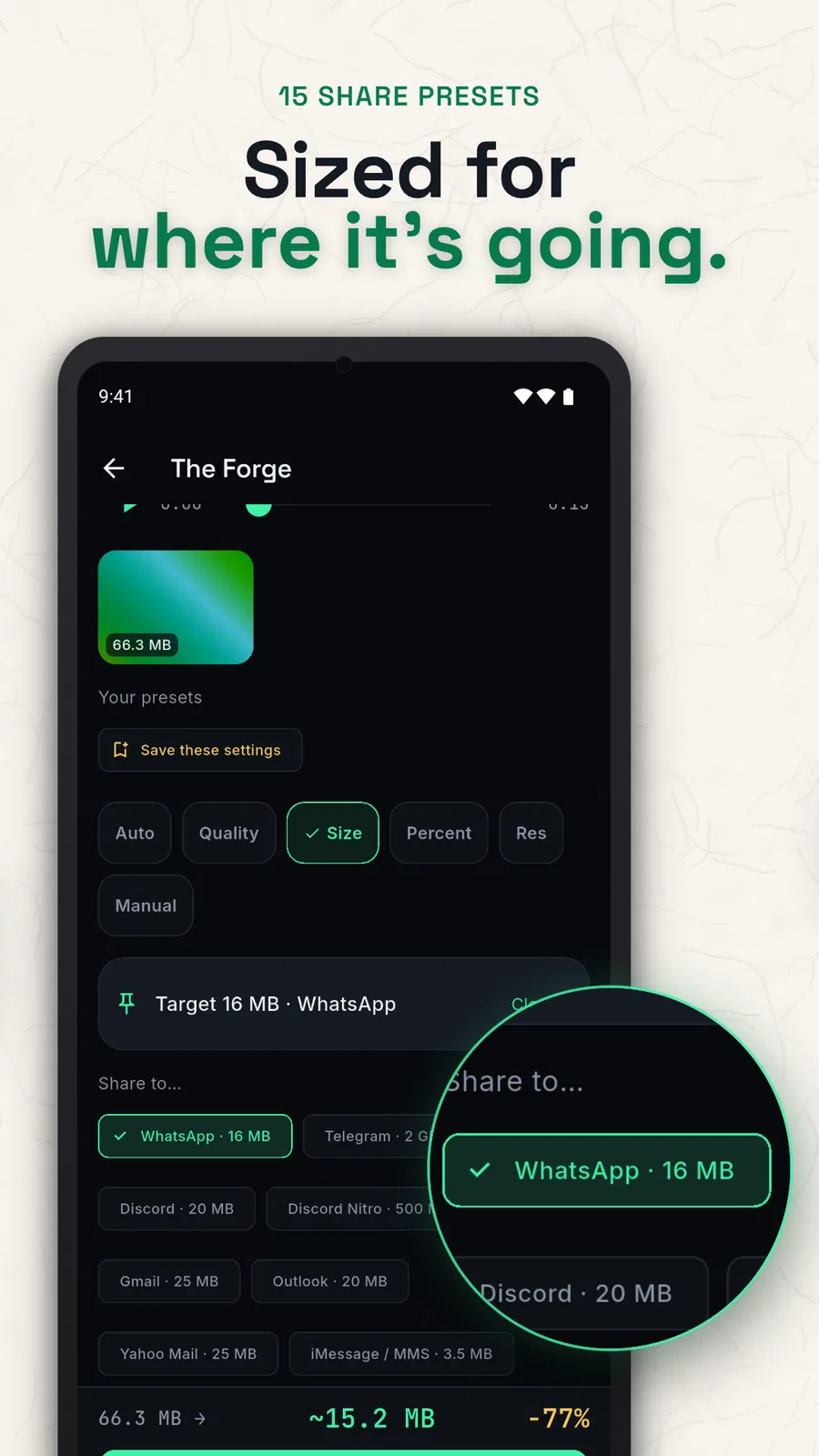
Choose how small a video should be in six ways: Ninja Auto, five quality levels, a target size such as 25 MB, a percentage, a resolution from 2160p down to 240p, or a manual bitrate. A live estimate shows the size before you commit. Fifteen one-tap share presets match the real limits of WhatsApp, Telegram, Discord, Gmail, Outlook, Instagram, TikTok, YouTube Shorts, X, LinkedIn and more.
The Reveal shows the original and the compressed copy side by side, so you can judge quality before keeping anything. An original is only touched after the copy passes nine checks, and you decide what happens to it.
The compressor is free, with no ads, no watermark and no daily cap. Convert, trim, crop, rotate, mute and frame grab are free too. Optional Ninja Pro adds batches of more than three videos, merge, speed, reverse, subtitles, watermark, extract audio, a GIF maker and H.265, VP9 and AV1. Pro is $0.99 per month, $5.99 per year or $14.99 lifetime.
What Ninja Compress does
- Six compression modes: Use Ninja Auto, quality, target size, percentage, resolution or manual bitrate, with a live size estimate.
- Platform share presets: Use one-tap targets for WhatsApp, Telegram, Discord, email, Instagram, TikTok, YouTube Shorts, X and LinkedIn.
- On-device processing: Compress, convert and edit on the phone without a server, account or upload; the app works offline.
- Before/after comparison: Compare the compressed video with the original at the same timestamp before deciding what to keep.
- Video editing toolbox: Convert, trim, crop, rotate, mute, grab frames and create GIFs, plus Pro tools such as merge and subtitles.
- Nine-check original protection: The output is checked for existence, playback, duration, audio, frames, gallery registration, size and completion before the original is touched.
Who it's for
People who need to shrink, convert or edit phone videos for messaging, email, social platforms or storage.
Why people use Ninja Compress
Phone videos can be too large for upload limits, and cloud-based compression requires sending personal footage to a server.
Ninja Compress processes videos on the phone, with target-size controls, platform presets, editing tools and a before/after review.
The app says compression happens entirely on-device, with no server, account or upload. A nine-check guard runs before an original can be moved, replaced or deleted.
Pricing
Ninja Compress is free to start, with paid plans from $5.99/year.
Platforms
Ninja Compress runs on iOS, Android.
Ninja Compress FAQ
- Does Ninja Compress upload videos?
- No. The site says compression, conversion and editing happen on the phone, with no server, account or upload.
- Does the app work offline?
- Yes. Compression, conversion and editing work without a connection. Buying or restoring Ninja Pro uses the store app; Pro then works offline.
- Is Ninja Compress free?
- The compressor is free, with every size mode, every share preset, selected editing tools, no ads, no watermark and no daily cap. Ninja Pro is optional.
- What does Ninja Pro add?
- Ninja Pro adds batches of more than three videos, eight advanced tools, H.265 / HEVC, VP9 and AV1, and unlimited saved presets.
- What platforms does it support?
- Ninja Compress is available for iPhone (iOS 15.0 or later) and Android (8.0 or later).
- Which video formats does it handle?
- It supports 12 containers including MP4, MOV, MKV and WebM. H.264, VP8 and MPEG-4 are free; H.265/HEVC, VP9 and AV1 come with Ninja Pro.
- Can it delete or replace the original video?
- Only after the compressed copy passes nine checks. The user can keep both, move the original to the Vault or system Trash, replace it, or use Android-only permanent deletion.
- How much does Ninja Pro cost?
- The site lists US prices of $0.99 per month, $5.99 per year or $14.99 once; local store prices may vary.
Ninja Compress launched on IndieLaunch on October 28, 2026 in Productivity, Security & Privacy. Visit Ninja Compress
New to these terms? Read what Freemium and Product-led growth mean.
Ninja Compress alternatives
 Tea App CheckerFree Tea app checker: search by name, city and age, or photo.
 Tickleafa calm place for everything you have to do
 MarklyKitHighlight and annotate web pages; search them from AI.
 ConnectVaultTurn every meeting into a lasting relationship
 VizitA simple check-in timer for people who work alone.
Discussion(0)
Sign in to leave feedback for the maker.
Log inNo comments yet
Be the first to give the maker feedback.