PassportPhoto.app
Free passport/visa/ID photo maker. Local, no upload, no watermark.
- Launched
- Oct 26, 2026
- Website
- passportphoto.app
- Pricing
- Free
- Platforms
- Web
- Based in
- China
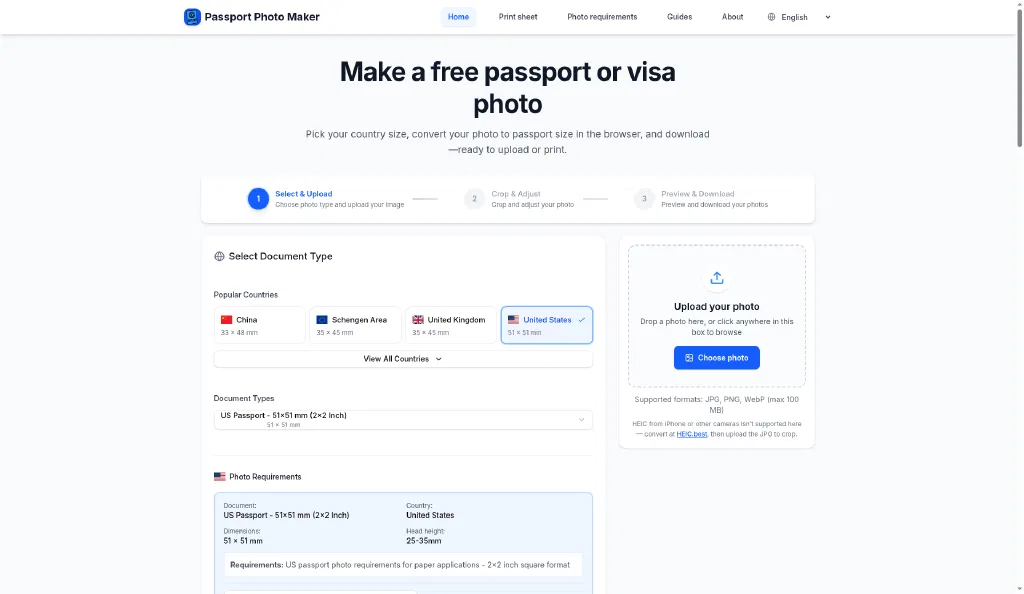
Free passport/visa/ID photo maker in the browser — local processing, no upload, no watermark. Multi-country official size templates.
What PassportPhoto.app does
- Country-specific templates: Crop portraits to official passport and visa sizes for the US, UK, Schengen, Canada, Australia, Japan, and more.
- Head-position guides: Align the head within an on-screen guide to help meet head-size and framing requirements.
- Basic image adjustments: Adjust brightness or contrast after positioning the portrait.
- Passport photo checker: Review common requirements such as background, expression, head size, and other checklist items before downloading.
- JPEG and print downloads: Download a JPEG for online forms or a print layout for mail-in applications.
- Private browser processing: Processing happens in the browser, so photos stay on the user's device.
Who it's for
Travelers, students, professionals, and anyone preparing a passport, visa, immigration, school, or overseas work application.
Why people use PassportPhoto.app
Official photo sizes, head dimensions, backgrounds, and other requirements are easy to get wrong, while studio visits may be inconvenient or costly.
It provides country-specific templates, head guides, basic image adjustments, a checklist, and downloads for online upload or printing.
Photos are processed in the browser and stay on the user's device; the tool is free, has no watermark, and requires no account.
Pricing
PassportPhoto.app is free to use.
Platforms
PassportPhoto.app runs on Web.
PassportPhoto.app FAQ
- Is Passport Photo Maker free?
- Yes. Crop, preview, and download at no charge, with no watermark and no subscription.
- Are photos uploaded to your servers?
- No. Processing happens in the browser and images stay on the device.
- Do I need to install an app?
- No. It runs in a browser on desktop or phone, including iPhone and Android.
- Which countries and sizes are supported?
- Templates and guides cover the US, UK, Schengen, China, Canada, Australia, Japan, South Korea, Spain, and more. Sizes include formats such as US 2×2 inches, 35×45 mm, and 50×70 mm.
- Can the downloaded photo be used for online applications?
- Many online renewal and visa systems accept a digital JPEG within their file-size limits. Follow the upload rules for the specific form; some routes still require prints.
- Will the photo definitely be accepted?
- The tool helps match common size and layout rules, but final approval depends on photo quality, background, expression, and the authority's current standards.
PassportPhoto.app launched on IndieLaunch on October 26, 2026 in Productivity, Design Tools. Visit PassportPhoto.app
New to these terms? Read what Side project and Indie hacker mean.
PassportPhoto.app alternatives
 FreePassportPicFree passport photo maker — US 2×2 and more, in-browser, no upload, no watermark
 ihateimg.cv58 free image tools that run in your browser and never upload your files
 Bad Quality Image MakerMake any image look intentionally bad — blurry, pixelated, or deep fried.
 DailyTools99Free browser tools for everyday image, text, developer, and utility tasks
 BeadDraftFree bead pattern maker: photo or text to a printable chart
Discussion(0)
Sign in to leave feedback for the maker.
Log inNo comments yet
Be the first to give the maker feedback.