
Markdown Viewer
A local-first Markdown workspace for reading, annotating, and exporting files
- Launched
- Nov 15, 2026
- Website
- markdownviewerextension.com
- Pricing
- Free
- Platforms
- Chrome extension
- Based in
- United States
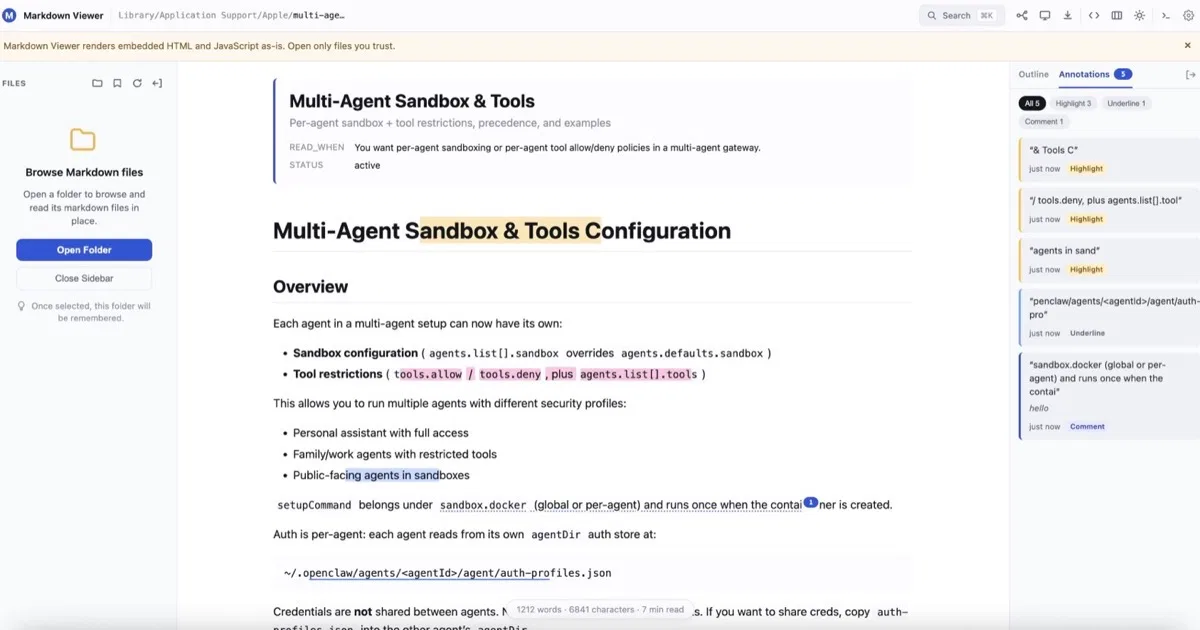
Markdown Viewer turns local files and raw web Markdown into a structured reading workspace in a Chromium-based browser. It lets readers browse folders, switch between documents, restore reading positions, follow an H1–H6 outline, and search one document or an entire folder. Highlights, underlines, and comments stay linked to the source passage.
The extension renders tables, tasks, footnotes, front matter, callouts, syntax-highlighted code, KaTeX math, and Mermaid, Graphviz, PlantUML, and Vega-Lite diagrams. The same document can be viewed as a document, mind map, or presentation, then exported as HTML, Word, PDF, PNG, or mind-map images. Core processing, annotations, recent-document history, and caches remain on the device; no account is required.
What Markdown Viewer does
- Folder workspace: Browse folders, switch between Markdown files, bookmark folders, and reopen recent documents at the saved reading position.
- Technical Markdown rendering: Render tables, tasks, footnotes, callouts, code, KaTeX math, and Mermaid, Graphviz, PlantUML, and Vega-Lite diagrams.
- Search and annotations: Use an H1–H6 outline, document or folder search, highlights, underlines, and comments linked to source passages.
- Three connected views: Read the same Markdown as a document, inspect its structure as a mind map, or present it full screen.
- Export: Export documents as standalone HTML, Word, PDF, or full-document PNG, and export mind maps as SVG, PNG, or JPEG.
- Local-first processing: Process documents on the device without an account; annotations, recent history, reading positions, and caches stay local.
Who it's for
People who read technical documentation, project plans, research drafts, reports, README files, and other local or raw web Markdown.
Why people use Markdown Viewer
Markdown files can be difficult to browse, search, annotate, present, and export without moving them into another editor or online converter.
It adds a folder-based reading workspace, rendering for technical Markdown, annotations, alternate views, search, and document export around the original source file.
The extension keeps document processing, annotations, recent history, and caches on the device while connecting reading, mind-map, presentation, and export views to one Markdown source.
Pricing
Markdown Viewer is free to use.
Platforms
Markdown Viewer runs on Chrome extension.
Markdown Viewer FAQ
- Which browsers are supported?
- Chrome, Edge, Brave, Opera, and Vivaldi are supported as Chromium-based browsers that can install Chromium extensions.
- Do I need an account?
- No. There is nothing to sign into, and documents, annotations, and bookmarks are handled locally in the browser.
- Can it open local Markdown files?
- Yes. Enable “Allow access to file URLs” in the extension details, then open or drag a local Markdown file.
- Does Markdown Viewer upload local files?
- No. Core document processing happens locally. Optional PlantUML rendering, link previews, remote refresh, and document-referenced external resources can make network requests when enabled or referenced.
- Can I purchase Pro now?
- Not yet. Pro features are currently unlocked during the promotional period. Pricing and purchase options will be announced when the licensing flow is ready.
- What remains free after promotional access?
- The workspace, folders, bookmarks, annotations, outline, core themes and skins, reading memory, diagrams, basic search, basic HTML/DOCX/print-PDF export, presentation, and mind-map view remain free.
Markdown Viewer launched on IndieLaunch on November 15, 2026 in Productivity. Visit Markdown Viewer
New to these terms? Read what Side project and Indie hacker mean.
Markdown Viewer alternatives
 DocmendClient feedback & e-signatures for Docs, PDF and Word
 CandyWriteA free platform for reading and publishing independent essays
 priv QRFree QR to STL and Matter QR tools in your browser
 PageUtilFree browser tools for documents, data, development, and everyday tasks
 ZIPZAX425 free online tools for everyday digital work
Discussion(0)
Sign in to leave feedback for the maker.
Log inNo comments yet
Be the first to give the maker feedback.