
- Launched
- Oct 17, 2026
- Website
- stratamaccleaner.com
- Pricing
- Freemium
- Platforms
- macOS
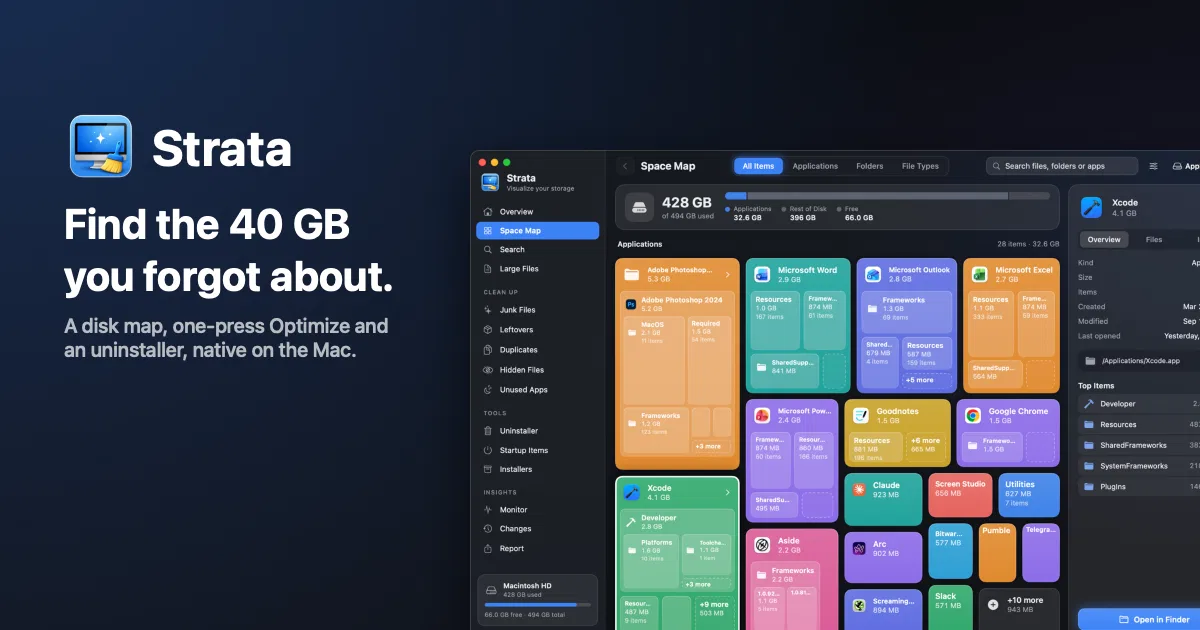
Strata Mac Cleaner helps you see what is using your Mac's storage and choose what to clear. It brings together junk-file cleanup, app uninstallation with leftover-file review, duplicate detection, large-file search, startup items and local AI model storage inspection. Review the items you select before removing them. Strata runs on macOS 13 or later, natively on Apple silicon and Intel Macs. Every feature is free for 14 days, removing up to 40 GB, with no card. Strata Pro is $19.99 USD, paid once. Black Friday: the next 10 licences are $10, then 10 at $15, then $19.99. Checkout charges whichever tier is current.
What Strata does
- Storage Overview: See what is using storage across drives, folders, apps and files.
- Search and Large Files: Search by name, extension, file kind or size, with saved and suggested searches.
- Cleanup and Optimize: Review selected cleanup items and app leftovers before removing them.
- AI Data Sweeper: Finds and sizes models from Apple Intelligence, Ollama, LM Studio, Hugging Face and other AI apps.
- App Uninstaller: Searches eighteen Library locations for app-related files, grades matches and offers to remove leftovers.
- Monitor and menu bar: Charts processor, memory, disk, battery and network activity and shows live readouts from the menu bar.
Who it's for
Mac users who want to understand what is using storage, find forgotten files and apps, or monitor system resources.
Why people use Strata
macOS storage settings can hide large folders and categorize much of the drive as System Data. Deleted apps, caches, build data, duplicates and AI models can also consume space without being easy to find.
Strata measures files and folders, searches for large or specific files, identifies cleanup candidates and app leftovers, and lets you review selected items before removal.
Strata combines storage inspection, cleanup candidate review, app uninstallation with leftover-file review, duplicate detection, startup items and local AI model storage inspection in a native Mac app.
Pricing
Strata is free to start, with paid plans from $19.99 as a one-time payment.
Platforms
Strata runs on macOS.
Strata FAQ
- Is there a free trial?
- Yes. Every download starts with 14 days of everything in Strata Pro, with removal of up to 40 GB. There is no account, card or cancellation. Afterward, Strata continues as the free version with no time limit.
- Is Strata Pro a subscription?
- No. Strata Pro is $19.99 USD, paid once.
- Can I review items before removing them?
- Yes. Review the items you select before removing them.
- Why does Strata ask for Full Disk Access?
- macOS hides data from Mail, Messages, Safari and other apps without that permission. The scan still runs without it, but those folders are invisible and totals may be incomplete. Nothing is uploaded either way.
- What Macs does Strata support?
- Strata requires macOS 13 Ventura or later and runs on Apple silicon and Intel Macs.
- What does Strata send over the network?
- Strata says it sends no telemetry or analytics and uploads nothing. The only thing it fetches is its own update, which can be turned off in Settings.
Strata launched on IndieLaunch on October 17, 2026 in Productivity. Visit Strata
New to these terms? Read what Freemium and Product-led growth mean.
Strata alternatives
 GearDexCamera gear inventory, shoot planning and client work in one app
 YapFast, private voice dictation for Mac and Windows
 Yap for iPhonePrivate voice dictation keyboard for iPhone
 CryptoIslandCrypto prices in your Mac’s notch (48h trial)
 3D ConverterConvert and inspect 3D models privately in your browser
Discussion(0)
Sign in to leave feedback for the maker.
Log inNo comments yet
Be the first to give the maker feedback.