
LaunchIntel
Curated directory playbooks for Claude Code and Codex
- Launched
- Nov 2, 2026
- Website
- launchintel.dev
- Pricing
- Paid
- Platforms
- Web, CLI
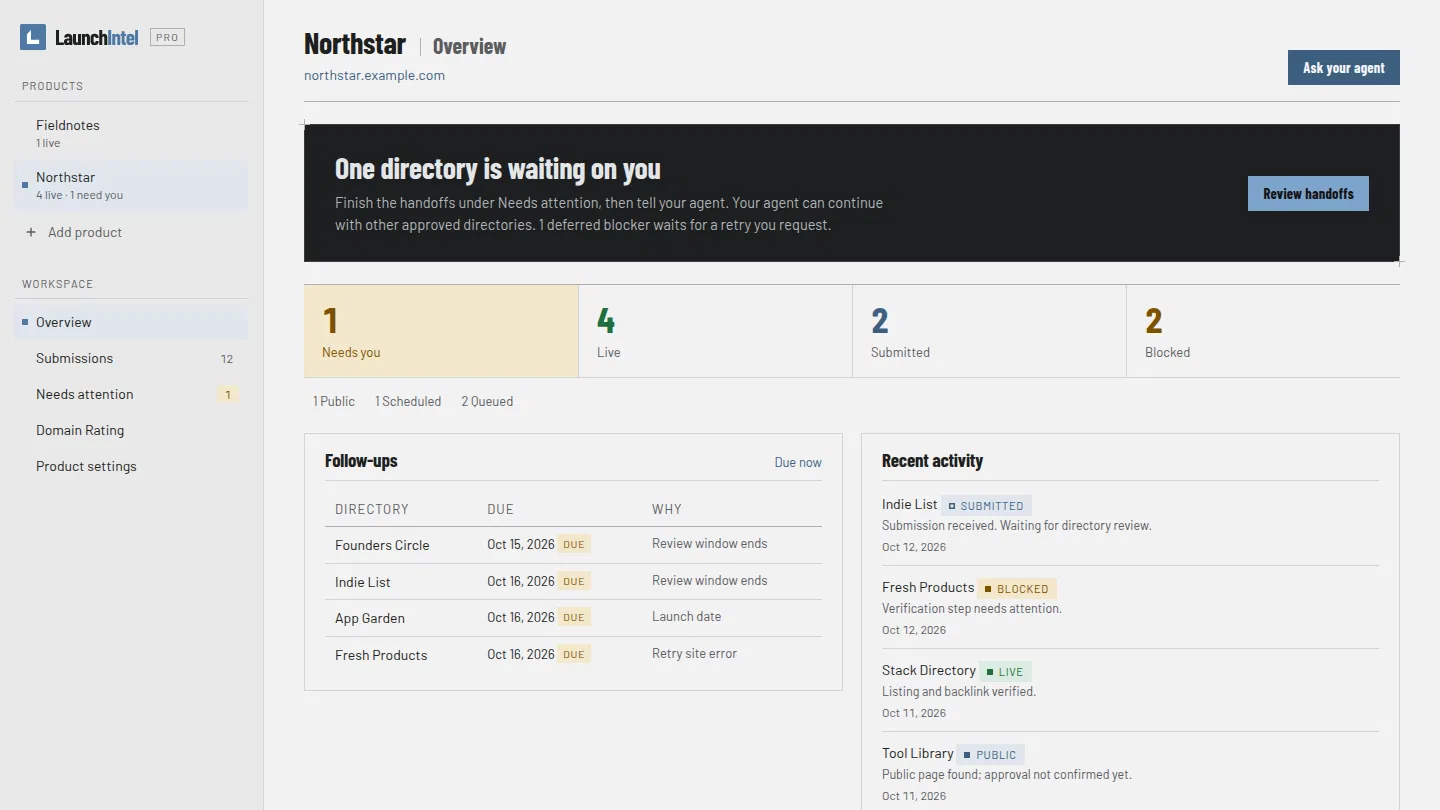
LaunchIntel helps founders launch a product to directories with an AI agent. It gives Claude Code or Codex a curated, categorized set of directory playbooks covering launch platforms, software catalogs and communities, plus a private agent workflow and a local dashboard, so the agent can choose relevant directories, prepare your listings and submit them in your own browser.
Every shipped playbook was submitted to end to end on a free route with a real product. Each guide records the form fields and limits, account and captcha requirements, costs, submission confirmation and follow-up steps for one directory.
You stay in control of the run. Your agent drafts a product kit from your site or an interview, and you approve the facts before the first submission. It then proposes a shortlist based on directory categories and requirements. You can rule out badge routes or known CAPTCHA routes and approve the queue. The agent uses free routes unless you approve a paid option, never invents facts and never votes or comments on other products.
The local dashboard keeps every product in one place. Switch between products, edit their brief and permissions, see what is awaiting review or needs your help, and track Domain Rating with optional daily checks. Your workspace stays on your computer.
LaunchIntel is a one-time purchase, delivered as access to a private GitHub repository through Polar. Solo covers unlimited products you own; Agency also covers client work. Updates land in the same repository. You need GitHub, Node 20 or newer, git and an agent with local file, terminal and browser access. Each directory decides what it accepts, so listings and links are not guaranteed.
What LaunchIntel does
- Tested directory playbooks: Tested routes for launch platforms, software catalogs, communities and other directories, with requirements and submission instructions.
- Fit-based shortlist: The agent checks directory categories and requirements against the product brief and proposes destinations for approval.
- Browser-based submissions: After approval, the agent fills forms in the user's browser and records each submission outcome.
- Local dashboard: Switch products, edit briefs and permissions, review blockers, and track live, pending and deferred listings.
- Approval controls: Approve the product kit, queue and run choices; control badges, spending, personal details and blocked steps.
- Domain Rating checks: The dashboard offers optional daily Domain Rating checks and history tracking.
Who it's for
Product makers and agencies that want an AI agent to submit products to relevant directories. Solo is for products the buyer owns; Agency also covers client work.
Why people use LaunchIntel
Submitting a product to many directories involves researching requirements, preparing repeated forms, handling accounts and captchas, and tracking follow-up work.
LaunchIntel supplies tested directory playbooks, lets the agent build and submit from an approved product kit, and provides a local dashboard for queues, blockers and outcomes.
Every shipped directory playbook was tested end to end with a real product.
Pricing
LaunchIntel is a paid product. Its website has the current prices.
Platforms
LaunchIntel runs on Web, CLI.
LaunchIntel FAQ
- What exactly is included?
- LaunchIntel Pro includes tested directory playbooks, private agent workflows, scripts and a local dashboard. The public installer skill opens the paid package but does not contain the paid material.
- What do I need to use LaunchIntel?
- You need GitHub, Node 20 or newer, git and a compatible AI agent with local file, terminal and browser access. Workflows are tested with Codex and Claude Code.
- Does LaunchIntel guarantee listings or backlinks?
- No. Each directory decides what it accepts, and a tested submission route is not a promise of publication or a backlink.
- Will the agent submit without asking?
- You approve the product kit, queue and run choices first. The agent then works through that queue; unresolved steps can be deferred or flagged for help.
- Can it be used for client products?
- Yes, with the Agency licence, which covers unlimited client products and commercial use. Solo is for products the buyer owns.
- Are paid directory placements included?
- No. The playbooks use free routes; AI-provider usage and any optional directory fees are separate.
- How is LaunchIntel delivered?
- After checkout, connect the desired GitHub account through the customer portal and accept the private repository invitation. Then install the public skill and ask the agent to use it.
- Can I use Gemini CLI, Cursor, Windsurf or GitHub Copilot?
- The site says submission workflows have been tested with Claude Code and Codex. Other agents need suitable local file, terminal and browser access, and the full workflow has not been verified with those named tools.
LaunchIntel launched on IndieLaunch on November 2, 2026 in Developer Tools, Productivity, Marketing. Visit LaunchIntel
New to these terms? Read what SaaS and Customer lifetime value mean.
LaunchIntel alternatives
 Agent Kit & Repo AuditChecked instruction files for AI coding assistants
 ExhibitantTrade show exhibits, B2B lead generation, and digital marketing.
 KyvenzaRun Windows 11, macOS and Linux VMs on Apple Silicon
 TinyShipAI-era SaaS starter: Skills + Recipes, no vendor lock-in — from $49.
 HaptikerVolume, brightness and keyboard light on your trackpad edges
Discussion(0)
Sign in to leave feedback for the maker.
Log inNo comments yet
Be the first to give the maker feedback.