Local Music Organizer
Organize Music.app libraries, find duplicates, inspect audio and convert files.
- Launched
- Nov 7, 2026
- Pricing
- Paid
- Platforms
- macOS
- Based in
- United States
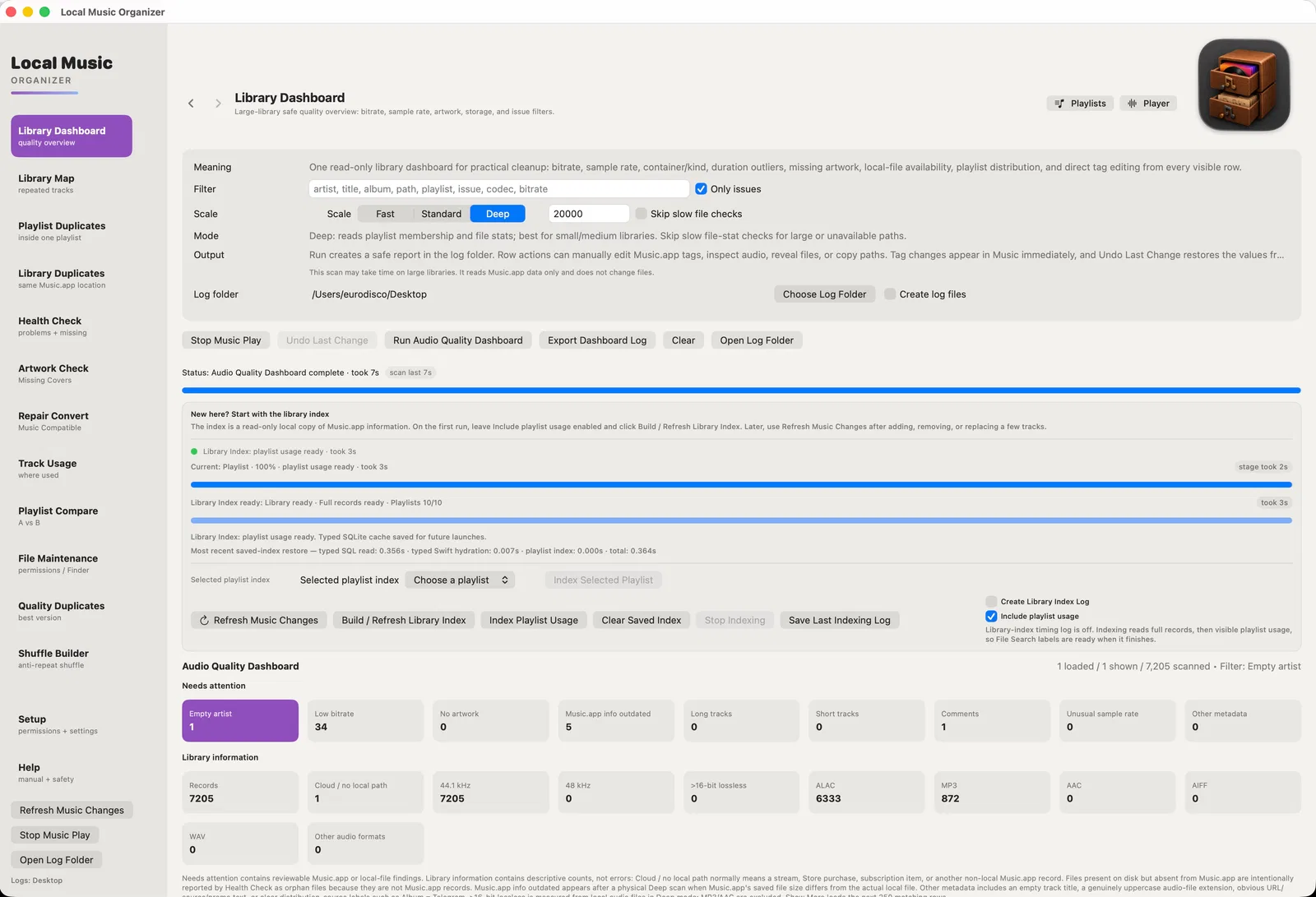
Local Music Organizer is a native macOS toolkit for large, physically stored music collections. It builds a persistent SQLite index of Music.app records and playlists, finds duplicates, missing files, incomplete albums and missing artwork, and helps relink moved audio without rebuilding playlists.
File Maintenance reviews permissions, filenames, Finder metadata and embedded tags. Audio Inspector and Authenticity Analyzer examine formats and suspected transcodes; A/B Compare aligns recordings and matches playback loudness.
Repair / Convert handles common and specialist formats, including FLAC, APE, TAK, DSD, SACD ISO and CUE. Everything runs locally, with explicit, reviewed file-changing actions.
It's designed for music collectors, DJs and archivists who manage large offline music libraries.
What Local Music Organizer does
- Library diagnostics and indexing: Build a persistent SQLite-based Library Index, inspect collection facts, and refresh only recent Music.app changes.
- Missing files and duplicate review: Find missing links, orphan files, duplicate playlist entries, duplicate records and different physical versions of recordings.
- Audio inspection and authenticity: Inspect codec, bitrate, sample rate, bit depth and spectrum, and review estimates for possible transcodes or upscaling.
- A/B comparison and local playback: Compare two local recordings with the same passage, optional temporary loudness matching, offset alignment and live spectra.
- File maintenance and metadata review: Review supported Music.app fields, filenames, Finder metadata, permissions and embedded tags before explicit cleanup.
- Repair and format conversion: Convert local audio with included offline engines, normalize supported files, process CUE sources and preview vinyl de-clicking.
- Library Index & Dashboard: Build a persistent SQLite index of Music.app tracks and playlists. Explore formats, bitrates, missing metadata and playlist usage with incremental updates.
- Health Check & Folder Relinking: Identify missing file references, orphan audio files and broken paths. Relink individual recordings or moved folders while preserving existing Music.app records
- Duplicate Detection: Separate repeated playlist entries, duplicate Music.app records and different physical versions of the same recording. Review each category independently.
- Library Map, Track Usage & Playlist Compare: Find where recordings are used, inspect playlist membership and compare shared or unique tracks across playlists.
- Album Completeness & Artwork Check: Detect potentially missing album tracks and discs from local numbering metadata. Identify recordings with missing artwork.
- File Maintenance: Inspect permissions, filenames, Finder extended attributes, Music.app tags and hidden embedded audio metadata. Review and verify supported corrections.
Who it's for
Collectors with large offline Music.app libraries, DJs, archivists and people managing local audio across internal and external drives. Especially useful when playlists, metadata, duplicates and rare audio formats have become difficult to maintain.
Why people use Local Music Organizer
Large music libraries accumulate missing files, duplicates, incomplete albums, inconsistent metadata and different recording versions. Rare audio formats are also difficult to manage.
LMO combines library indexing, diagnostics, duplicate detection, file maintenance, A/B audio comparison and rare-format conversion. Everything runs locally, with explicit control over changes.
Built by a music collector for real-world needs, LMO combines persistent library indexing, safe file maintenance, duplicate detection, A/B audio comparison and rare-format conversion in one native Mac app. Everything runs locally.
Pricing
Local Music Organizer is a paid product, starting at $29.99 as a one-time payment.
Platforms
Local Music Organizer runs on macOS.
Local Music Organizer FAQ
- Does Local Music Organizer require an Apple Music subscription?
- No. It is designed for locally stored Music.app records and physically available local audio files. Apple Music subscription content, cloud-only files and streaming audio are outside the supported local-file workflow.
- What operating system does it require?
- The app requires macOS 14 or later and includes universal Apple Silicon and Intel engines.
- Is there a subscription or automatic charge after the trial?
- No. The trial provides full access for three days, does not renew and creates no automatic charge. Continued use requires a one-time Full Version purchase.
- Does the app upload audio or library data?
- No. The app has no Local Music Organizer account or sign-in, does not upload audio or library data, and processing stays on the Mac.
- Will scans change my library automatically?
- No. Dashboards, searches, comparisons and authenticity analysis are diagnostic until an explicit action is chosen. Edits and file actions require user selection and confirmation.
- Can it work with files outside Music.app?
- Yes. Audio Inspector, Live Spectrum, authenticity analysis, playback, repair and conversion can work with individual local files opened from Finder or added by drag and drop.
- an Local Music Organizer repair missing tracks without importing everything again?
- Yes. Health Check can relink an individual Music.app record or map an entire moved folder to its new location, preserving existing records and playlist references where supported.
- What kinds of duplicates can it find?
- It distinguishes repeated playlist entries, duplicate Music.app library records and different physical recordings of the same song. These are separate tools because they require different review and cleanup actions.
- Can I compare recordings that are not in Music.app?
- Yes. Manual A/B Compare lets you select any two supported local audio files. You can align passages, match playback loudness, switch between recordings and examine their live spectra without altering the sources.
- Does the Audio Authenticity Analyzer prove whether a recording is genuine lossless?
- No. It examines spectral and technical indicators of possible transcoding or upscaling. Results are estimates intended for review, not definitive proof.
- Does conversion overwrite my original audio files?
- Converted output is verified before original-file handling. You can keep the source, move it to Trash or archive it in a backup folder. Conversion does not start automatically when files are added to the queue.
- Can it identify missing tracks from an album?
- Yes. Album Completeness examines the locally stored track and disc numbering information. It reports missing numbered positions or conflicting totals without searching online databases or guessing track names.
Local Music Organizer launched on IndieLaunch on November 7, 2026 in Productivity, Analytics & Data. Visit Local Music Organizer
New to these terms? Read what SaaS and Customer lifetime value mean.
Local Music Organizer alternatives
 HaptikerVolume, brightness and keyboard light on your trackpad edges
 SundownA Mac menu bar app that warms and dims your screen on a schedule you set.
 StaySheet Co.Buy-once spreadsheet trackers for landlords, freelancers and sellers.
 JourneyDeckRoad trip journal that matches your music to your route
 AION 2 Class FinderFree AION 2 class finder with filters and comparison
Discussion(0)
Sign in to leave feedback for the maker.
Log inNo comments yet
Be the first to give the maker feedback.