
ArkWarden
Encrypted photo and file vault for iPhone. No account, no server.
- Launched
- Nov 2, 2026
- Website
- arkwarden.app
- Pricing
- Paid
- Platforms
- iOS
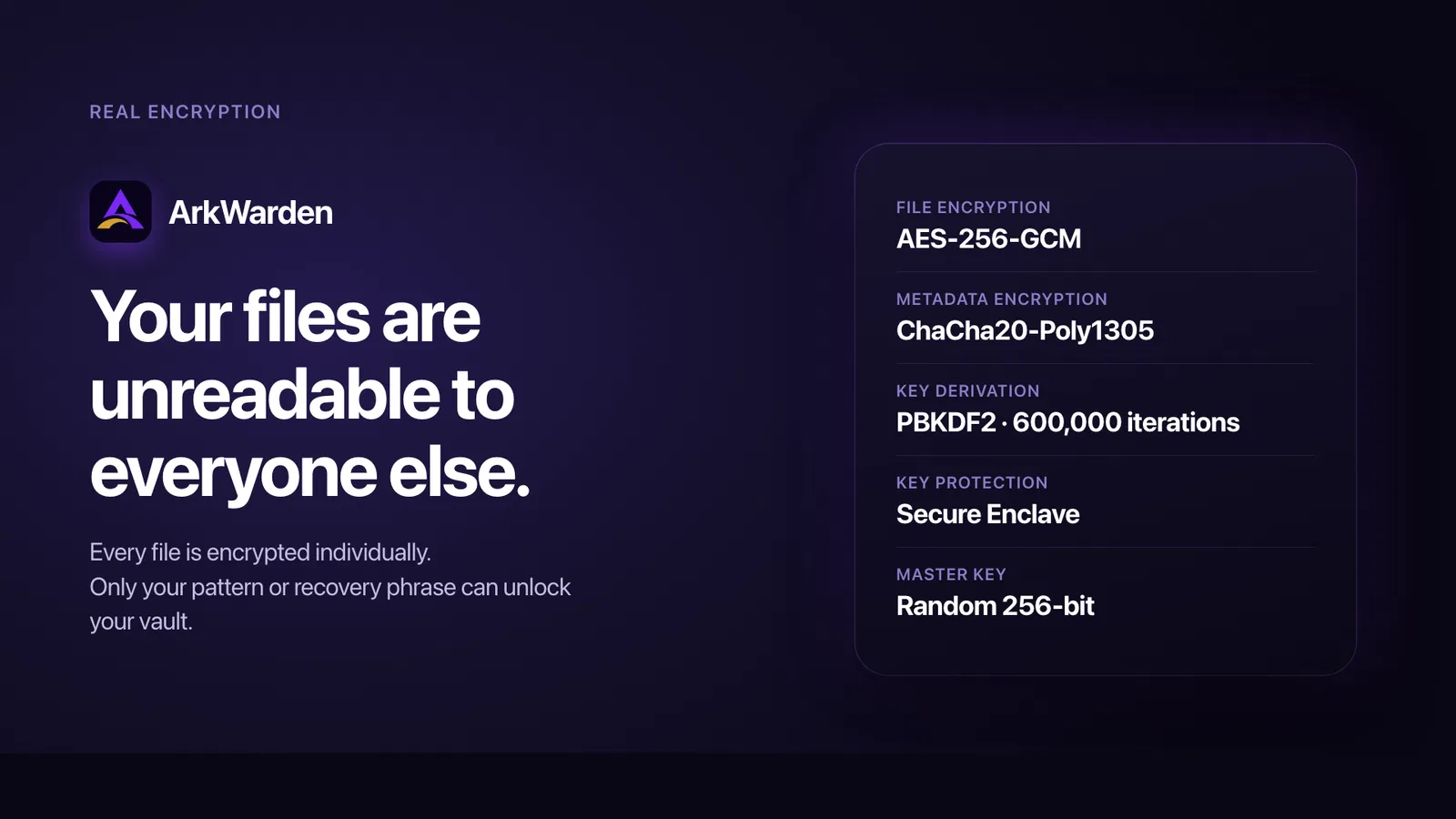
ArkWarden is an encrypted photo and file vault for iPhone. Private photos, videos, audio and documents stay behind a pattern you draw, with Face ID, a PIN or a YubiKey as an optional second factor and AES-256 encryption on every file. Your pattern helps unlock a 256-bit master key, with Secure Enclave protection on your iPhone. Organize files inside unlimited folders. A 12 or 24 word recovery phrase restores access if you forget your pattern. Optional backup goes to your own iCloud or a file, encrypted on your phone first. The encryption code is open source. No account, no ads.
What ArkWarden does
- On-device file encryption: Encrypts photos, videos, documents, and audio on the iPhone before they enter the vault.
- Pattern unlock: Uses a pattern on a 5x5 grid together with the iPhone’s Secure Enclave to unlock the vault.
- Optional two-factor authentication: Add Face ID or Touch ID, a separate 6-digit PIN, or a YubiKey over NFC after the pattern.
- Wing second vault: Open a separate vault with its own pattern, files, folders, name, color, and appearance.
- Recovery and backup: Use a 12- or 24-word recovery phrase and optionally create encrypted iCloud or exported-file backups.
- Intruder detection: After 3, 5, or 10 wrong pattern attempts, optionally capture an encrypted front-camera photo.
Who it's for
iPhone users who keep private photos, videos, documents or audio on their phone and want them encrypted: people who share or hand over their phone, parents, travellers, and anyone storing IDs, contracts or medical records. Also people who prefer an app with no account or server.
Why people use ArkWarden
Private files on an iPhone usually sit in the Photos or Files app, which opens with the same Face ID or passcode as the phone. Anyone who knows the passcode, or is holding the phone unlocked, can see them.
ArkWarden keeps private files in an encrypted vault on the iPhone. Each file is encrypted on the device with AES-256-GCM, and the vault opens with a pattern you draw, combined with a key held in the iPhone's Secure Enclave. There is no account and no ArkWarden server.
The vault has its own key, separate from the iPhone passcode, and that key is tied to the iPhone's Secure Enclave. ArkWarden passed Yubico's technical review and is listed in the Works with YubiKey catalog. Its encryption code is open source, so anyone can check how it works.
Pricing
ArkWarden is a paid product. Its website has the current prices.
Platforms
ArkWarden runs on iOS.
ArkWarden FAQ
- Does ArkWarden have access to my files?
- No. Files are encrypted on the device with a master key that never leaves the phone. There is no ArkWarden server or account.
- Do I need an account or internet connection?
- No. There is no sign-up, email, or password, and the app works fully offline.
- What happens if I forget my pattern?
- A 12- or 24-word recovery phrase generated during setup can unlock the vault and let you set a new pattern.
- What second factors does ArkWarden support?
- You can add Face ID or Touch ID, a separate 6-digit PIN, or a YubiKey hardware security key over NFC.
- What is Wing?
- Wing is an optional second vault with its own pattern, name, color, files, and folders. The main vault stays hidden when Wing is opened.
- Can I back up and restore my vault?
- Yes. Optional backups can go to iCloud or an exported file. The vault is encrypted before leaving the iPhone.
- Is ArkWarden open source?
- Its core encryption code is open source. The published code covers main-vault encryption, key derivation, master-key encryption, and key storage.
- How do I permanently delete photos on iPhone?
- Delete the photo in Photos, then delete it again in Recently Deleted. After the second delete, it cannot be recovered in Photos, and with iCloud Photos on it leaves your other devices too. Full guide: https://arkwarden.app/guides/permanently-delete-photos-iphone https://arkwarden.app/de/guides/permanently-delete-photos-iphone https://arkwarden.app/es/guides/permanently-delete-photos-iphone
- How do I lock a folder on iPhone?
- On iOS 18 and later you can lock the whole Files app with Face ID, Touch ID or your passcode. For one folder with its own key, create it inside a vault app that encrypts the files. Full guide: https://arkwarden.app/guides/password-protect-folder-on-iphone https://arkwarden.app/de/guides/password-protect-folder-on-iphone https://arkwarden.app/es/guides/password-protect-folder-on-iphone
- How do I hide and unhide photos on iPhone?
- Touch and hold a photo in the library or an album and tap Hide. To unhide it, open the Hidden album under Collections, touch and hold the photo and tap Unhide. For photos with their own key, ArkWarden encrypts them on your iPhone. Full guide: https://arkwarden.app/guides/hidden-photos-iphone https://arkwarden.app/de/guides/hidden-photos-iphone https://arkwarden.app/es/guides/hidden-photos-iphone
- How do I lock photos on iPhone?
- On iOS 18 and later, touch and hold the Photos app, tap Require Face ID (or Touch ID or Passcode), then confirm on the next screen. ArkWarden encrypts them on your iPhone and opens them with a pattern you draw. Full guide: https://arkwarden.app/guides/lock-photos-iphone https://arkwarden.app/de/guides/lock-photos-iphone https://arkwarden.app/es/guides/lock-photos-iphone
ArkWarden launched on IndieLaunch on November 2, 2026 in Security & Privacy, Open Source. Visit ArkWarden
New to these terms? Read what SaaS and Customer lifetime value mean.
ArkWarden alternatives
 UrbanCacheEmergency kits held in five cities for members away from home
 Wasm ArcadeFree browser arcade games
 SuccessionKeeperKeep track of what you have and where it is held.
 FinderBuddyCompress, convert, resize and rename files from the Mac Finder right-click menu
 WhitelistVideoYouTube parental controls for children who have outgrown YouTube Kids
Discussion(0)
Sign in to leave feedback for the maker.
Log inNo comments yet
Be the first to give the maker feedback.