
- Launched
- Nov 9, 2026
- Website
- beaddraft.com
- Pricing
- Free
- Platforms
- Web
- Based in
- United States
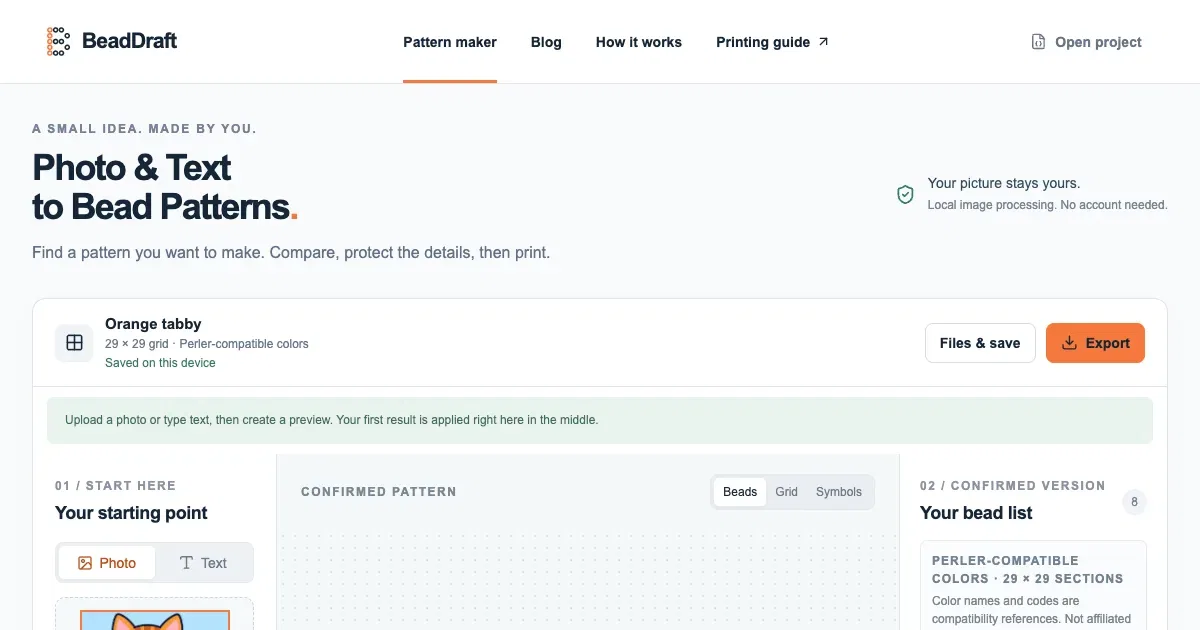
BeadDraft is a free bead pattern maker. Turn a photo or text into an editable fuse-bead pattern, then export a printable PDF chart, a bead list by color, CSV, PNG or JSON. 103 Perler-compatible colors, runs in your browser, no account.
What BeadDraft does
- Photo and text to pattern: Upload a JPG, PNG or WebP, or type a short word or name, and turn it into a bead grid.
- Crop and size controls: Crop the source and set the grid width in beads; the height follows the crop.
- Color matching: Match the source to a Perler-compatible palette and cap the colors for new generations.
- Protect and simplify: Protect important cells, preview simplification of isolated specks, and apply changes only when ready.
- Manual grid editing: Paint, fill, erase, replace colors, and undo changes directly on the pattern.
- Project exports: Export a printable reading chart, material list, and editable backup.
Who it's for
People who design and make fuse-bead projects from photos, text, or their own edits.
Why people use BeadDraft
Turning a photo or short message into a practical bead grid requires choosing a size, reducing colors, preserving important details, and counting materials.
BeadDraft samples photos or text into an editable grid, provides controls for size, colors, protection and simplification, and exports a chart, bead list and editable backup.
Image processing happens in the browser, so photos are not uploaded. Patterns use Perler-compatible color references and remain editable before export.
Pricing
BeadDraft is free to use.
Platforms
BeadDraft runs on Web.
BeadDraft FAQ
- Does BeadDraft upload my photos?
- No. Images are read and converted in the browser. There is no account and no upload step.
- What image formats and sizes are accepted?
- JPG, PNG and WebP files up to 15 MB and roughly 24 megapixels.
- Can text be turned into a bead pattern?
- Yes. Switch the input to Text and type a short word or name.
- How does the grid size work?
- Set the width in beads. The height follows the crop, and both dimensions are capped at 120.
- Can the pattern be edited by hand?
- Yes. You can paint, fill and erase cells, protect details, simplify stray beads, replace colors, and undo changes.
- Does Simplify target a specific number of colors?
- No. Simplify cleans up isolated one- or two-bead specks; use Max colors before generation to cap the new grid's palette.
- What can be exported?
- The tool exports a printable chart, a bead list and an editable backup.
- Which bead brands does it support?
- New patterns use Perler-compatible color references. The grid itself is brand-independent, but physical shades should be checked against the beads in the kit.
BeadDraft launched on IndieLaunch on November 9, 2026 in Design Tools. Visit BeadDraft
New to these terms? Read what Side project and Indie hacker mean.
BeadDraft alternatives
 SVG to Lottie ConverterTurn static SVG files into Lottie JSON in your browser
 PassportPhoto.appFree passport/visa/ID photo maker. Local, no upload, no watermark.
 FreePassportPicFree passport photo maker — US 2×2 and more, in-browser, no upload, no watermark
 RasterbatorCreate large halftone wall posters from photos in your browser
 Free App LogoCreate app logos and brand assets in your browser, without signup or watermarks.
Discussion(0)
Sign in to leave feedback for the maker.
Log inNo comments yet
Be the first to give the maker feedback.