Shake It OnShake It On
A Mac mouse jiggler for keeping your cursor active and Mac awakeKeeps your Mac a
- Launched
- Nov 19, 2026
- Website
- shakeiton.app
- Pricing
- Paid
- Platforms
- macOS
- Based in
- United States
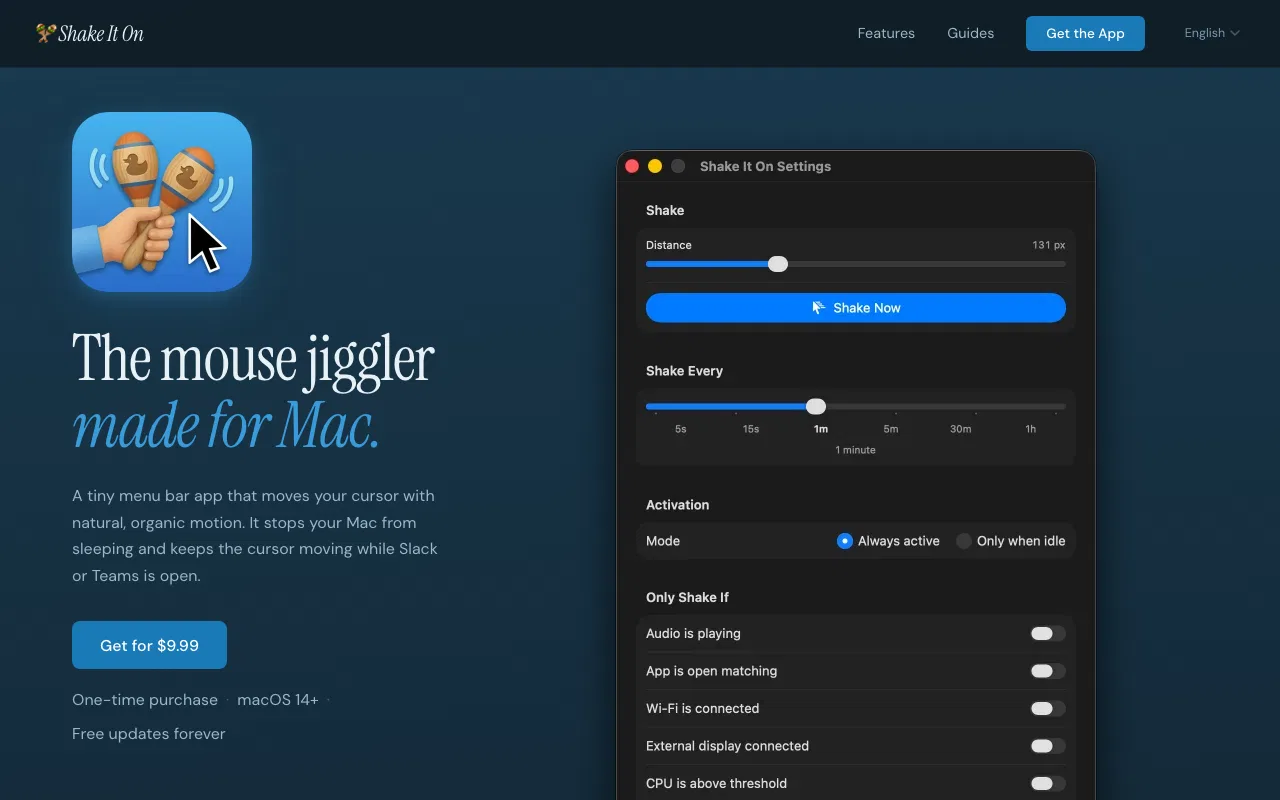
Shake It On is a macOS menu bar utility that keeps a Mac awake by moving the cursor in smooth, layered sine-wave patterns. It generates real cursor input events, so apps that track presence can see activity while Slack, Teams, Zoom, and remote-desktop sessions are running. The cursor returns to its original position after each movement.
The app is designed for Mac users who need to prevent sleep, maintain activity during long-running work, or keep a remote session alive. Rules can limit shaking to situations such as a specific app being open, audio playing, CPU use reaching a threshold, a network condition, or a schedule. Safety controls pause it during camera use, Focus modes, screen locks, display-off states, or battery operation. It runs from the menu bar and can launch at login.Shake It On is a Mac menu bar app that keeps your computer awake by moving the mouse with organic, natural movement, so your Mac sees real input. Smart conditions decide when it runs (audio playing, an app running, a Wi-Fi network, an external display, CPU above a threshold) and it pauses itself for the camera, Focus, screen lock, the screensaver and battery. Schedules, snooze and a global shortcut included. $9.99 one-time, macOS 14+.
What Shake It OnShake It On does
- Organic mouse movement: Layered sine-wave cursor motion imitates a real hand and returns the cursor to its original position.
- Smart conditions: Run only when selected apps, audio, CPU activity, network states, devices, disks, or displays meet configured conditions.
- Safety pauses: Pause automatically for camera use, Focus or Do Not Disturb, screen locks, display-off states, specific foreground apps, or battery use.
- Schedules and intervals: Choose shake intervals from 5 seconds to 1 hour and activate the app on selected days and times.
- Snooze and stay-awake controls: Pause or keep the Mac awake for preset or custom durations, with auto-disable options.
- Automation and menu-bar control: Use sessions, AppleScript, URL automation, Shortcuts intents, keyboard shortcuts, and a menu-bar interface.
Who it's for
Mac users who need to keep their computer awake or maintain activity in apps such as Slack, Teams, Zoom, and remote-desktop clients.
Why people use Shake It OnShake It On
A sleeping Mac can interrupt long-running work, remote sessions, presentations, or activity indicators. System-level keep-awake tools may not create the cursor input that presence-aware apps detect.
Shake It On moves the cursor with natural-looking motion and lets users control when it runs through conditions, schedules, pauses, snooze settings, and menu-bar controls.
It uses real cursor input rather than only system-level sleep-prevention assertions, while returning the cursor to the exact same pixel after each shake.
Pricing
Shake It OnShake It On is a paid product, starting at $9.99 as a one-time payment.
Platforms
Shake It OnShake It On runs on macOS.
Shake It OnShake It On FAQ
- Does it keep Slack, Teams, and Zoom status active?
- Yes. Shake It On generates real cursor input events, so macOS reports activity and apps that track user presence can see you as present.
- Is there a subscription?
- No. It is a one-time purchase of $9.99, and the app includes future updates without recurring charges.
- Which Macs does it support?
- It requires macOS 14.0 (Sonoma) or later and supports both Intel and Apple Silicon Macs.
- Will it drain the battery?
- The app can automatically pause when the Mac is on battery. It can also run only under selected conditions, and uses virtually no resources when it is not shaking.
- Does it work on corporate-managed Macs?
- It can work if IT permits notarized third-party apps. If installs are restricted to the Mac App Store or an allowlist, users should check with IT first.
- How are updates delivered?
- Updates install from inside the app through its built-in Sparkle updater and are included with the purchase.
- Can the license be used on more than one Mac?
- The lifetime license can be used on any Mac personally owned by the purchaser, with no limit on the number of those Macs. The license is non-transferable.
Shake It OnShake It On launched on IndieLaunch on November 19, 2026 in Productivity. Visit Shake It OnShake It On
New to these terms? Read what SaaS and Customer lifetime value mean.
Shake It OnShake It On alternatives
 DotwattTime left, the apps spending the charge and an 80% limit, in your Mac menu bar
 HaptikerVolume, brightness and keyboard light on your trackpad edges
 MultimeterMeters for anything, in your Mac's menu bar
 FinderBuddyCompress, convert, resize and rename files from the Mac Finder right-click menu
 TimerflyAutomatic employee monitoring and attendance tracking
Discussion(0)
Sign in to leave feedback for the maker.
Log inNo comments yet
Be the first to give the maker feedback.